

IoT & Wireless Automation
Building an ESP32 Smart Room Weather Logger with DHT11 and OLED
June 4, 2026
10 min read
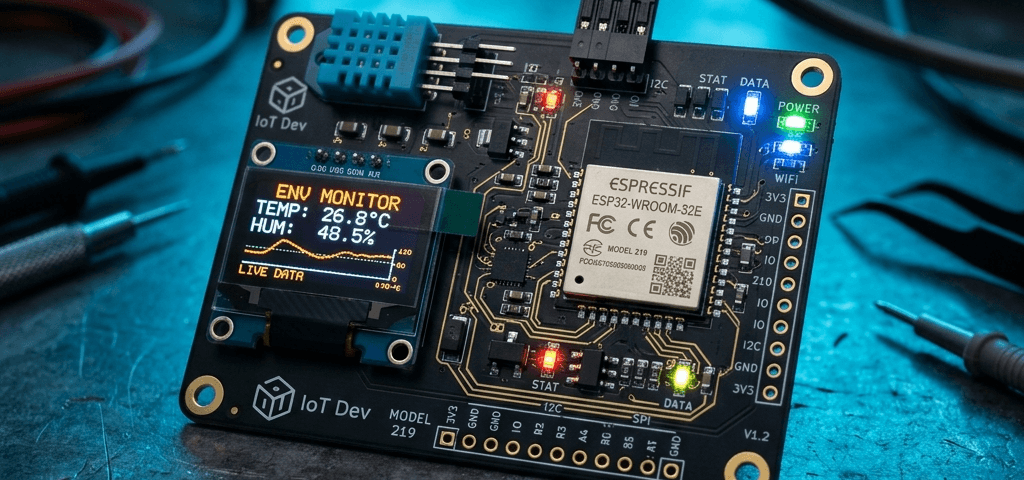
Monitoring room temperature and humidity is the cornerstone of home automation. In this guide, we will connect a sensor and display to the ESP32 and program it to serve stats on a local website.
Introduction & Concept
By pairing the dual-core ESP32 microcontroller with a DHT11 temperature and humidity sensor, we can create a powerful local weather node. We will read the ambient values, display them locally on a 0.91" OLED screen, and initialize a basic HTTP web server that allows any smartphone connected to the same Wi-Fi network to view the logs.
Required Electronic Components
| Component Name | Store Link |
|---|---|
| ESP32 WROOM-32 NodeMCU Development Board | Buy ESP32 Board |
| DHT11 Temperature & Humidity Module | Buy DHT11 Module |
| 0.91 inch I2C OLED Display Module | Buy 0.91 OLED Screen |
Wiring Connections Diagram
     [ESP32 Development Board]
     +-----------------------+
     |                       |
     |                  3.3V |------------+------------+ (VCC)
     |                   GND |------------|------------| (GND)
     |         GPIO21  (SDA) |------------|----> SDA   |
     |         GPIO22  (SCL) |------------|----> SCL   | [0.91" OLED]
     |         GPIO4  (Data) |------->    |            |
     +-----------------------+       |    +------------+
                                     |
                                     v
                                   [DATA] ---> [DHT11 Sensor]
Wiring Table
| OLED / DHT11 Pin | ESP32 Pin | Description |
|---|---|---|
| OLED VCC / DHT11 VCC | 3.3V | Power Source |
| OLED GND / DHT11 GND | GND | Ground Reference |
| OLED SDA | GPIO 21 | I2C Data Line |
| OLED SCL | GPIO 22 | I2C Clock Line |
| DHT11 Data | GPIO 4 | Digital Signal Data |
Program Sketch
#include <WiFi.h>
#include <Wire.h>
#include <Adafruit_GFX.h>
#include <Adafruit_SSD1306.h>
#include <DHT.h>

#define SCREEN_WIDTH 128
#define SCREEN_HEIGHT 32
Adafruit_SSD1306 display(SCREEN_WIDTH, SCREEN_HEIGHT, &Wire, -1);
DHT dht(4, DHT11);

const char* ssid = "Your_WiFi_Name";
const char* password = "Your_WiFi_Password";
WiFiServer server(80);

void setup() {
  Serial.begin(115200);
  dht.begin();
  if(!display.begin(SSD1306_SWITCHCAPVCC, 0x3C)) {
    Serial.println("SSD1306 allocation failed");
    for(;;);
  }
  display.clearDisplay();
  display.setTextSize(1);
  display.setTextColor(WHITE);

  WiFi.begin(ssid, password);
  while (WiFi.status() != WL_CONNECTED) {
    delay(500);
  }
  server.begin();
}

void loop() {
  float t = dht.readTemperature();
  float h = dht.readHumidity();

  display.clearDisplay();
  display.setCursor(0,0);
  display.printf("IP: %s\nT: %.1f C | H: %.1f %%", WiFi.localIP().toString().c_str(), t, h);
  display.display();
  delay(2000);
}